Recify vs Copy Me That: which recipe saver should you use?
We make Recify, so read this with that in mind.
Choose Copy Me That if you save mostly from websites, want to reach your recipes from any computer’s browser, and want a shopping list and meal planner at a very low price. Choose Recify if your recipes come from TikTok, Instagram and YouTube videos, especially ones where the amounts are said out loud: Recify reads the spoken audio, while Copy Me That doesn’t say how it handles social media posts.
Updated November 2026. Copy Me That facts come from copymethat.com and its US App Store page, checked on 27 November 2026; prices are US prices as of November 2026.
How do Recify and Copy Me That compare?
Copy Me That is a budget recipe box built around websites and the browser. Recify is a phone app built around turning links, including video links, into clean recipes.
| At a glance | Recify | Copy Me That |
|---|---|---|
| Devices | iPhone, iPad, Android | iPhone, Android, any web browser, Chrome extension |
| Free version | A limited number of imports; saved recipes never locked | Up to 40 recipes, every feature included |
| Paid plan (as of Nov 2026) | Pro: weekly, monthly, yearly or lifetime (prices in the app) | Membership: $0.99 a month, $12.00 a year or $65.00 lifetime |
| TikTok, Instagram, YouTube | Reads the caption and the spoken audio | Saves “from most apps, including social media apps”; doesn’t say how |
| Recipe websites | Paste or share the link | Browser button or extension, in-app browser, share from most apps |
| Write a recipe from scratch | No (you can paste recipe text) | Yes |
| Meal plan | Weekly calendar | Calendar, a queue and reusable meal sets |
| Shopping list | No | Yes, sorted by aisle, several lists, smart merging |
| Nutrition | Nutrition card on the recipe (may need Pro) | Not stated |
| Scaling | Yes | Yes |
| Cook mode | One step at a time, full screen | Keeps the screen awake, cross off ingredients, tracks your step |
| Languages | App in 8 languages, recipe translation | Recipe detection optimized for English |
| Export | One recipe at a time: PDF, link or images | Export your recipes at any time |
| US App Store rating | 4.8 from 784 ratings | 4.6 from 1,195 ratings |
Which is better for saving recipes from videos?
Recify is the safer choice for videos, because it documents what it reads: the caption or description, and what’s said out loud in the video. Many cooking creators speak the amounts instead of writing them, and those recipes still come out as a written list in Recify.
Copy Me That’s App Store page says it can save recipes “from most apps, including social media apps”, and a version note mentions Instagram and Facebook. It doesn’t say whether it reads the caption only or the video too, so try a few of your own saved videos during the free 40 recipes before you decide.
One limit applies to Recify: a video with only music, and no recipe written or spoken anywhere, can’t be imported. In that case, look for the creator’s website and save that link.
Where is Copy Me That better?
Copy Me That wins on access from a computer, price and shopping:
- It works in any browser. You can save, browse and plan from a laptop at work or a family computer. Recify has no desktop or web app.
- A low price, and a lifetime option. $0.99 a month or $65.00 for life on the US App Store, as of November 2026. The free tier includes every feature up to 40 recipes.
- A real shopping list. Aisle sorting, several lists, smart merging of ingredients and a master pantry list. Recify has no shopping list.
- A flexible meal planner, with a calendar, a queue of recipes to cook next and reusable meal sets.
- Typing your own recipes. You can enter recipes by hand. Recify can’t create a recipe from scratch, though it accepts pasted recipe text.
- Exporting everything. Copy Me That lets you export your recipes at any time. Recify exports one recipe at a time.
Where is Recify better?
Recify wins when your recipes come from social video and you want each one cleaned up for you:
- Spoken recipes become written ones, with ingredients, method and servings.
- One-tap saving on iPhone. Share from TikTok, Instagram or Safari (iOS 17.6 or later), pick a collection, and keep scrolling. The import runs in the background and a notification tells you when it’s done. On Android you paste the link.
- Languages. The app speaks 8 languages and translates recipes between them, while Copy Me That’s recipe detection is optimized for English.
- Cooking tools on each recipe: a nutrition card, servings you can scale, a full-screen step-by-step mode and a printable PDF.
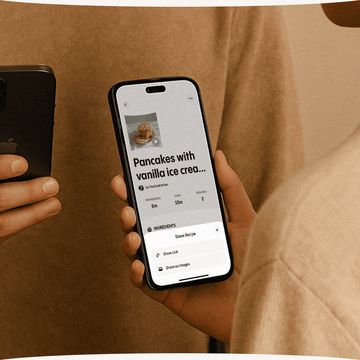
- Sharing. Send a recipe as a link that opens in a friend’s Recify app, or as images for chats and stories.
Which should you choose?
Choose by where your recipes come from and where you want to see them:
- Copy Me That if you mostly save blog recipes, want a browser version and a shopping list, and like a very low price or a lifetime membership.
- Recify if you mostly save TikToks, Reels and YouTube videos, and want them turned into recipes you can cook from on your phone.
If you’re still comparing, our list of the best recipe keeper apps covers eight apps side by side. For step-by-step help, read how to save recipes from Instagram or how to save recipes from websites.
Frequently asked questions
Is Copy Me That free?
Copy Me That is free for up to 40 recipes, with every feature included. After that you need a membership; as of November 2026 the US App Store lists $0.99 a month, $12.00 a year or $65.00 for a lifetime membership.
Does Copy Me That work on a computer?
Yes. Copy Me That works in any web browser and has a Chrome extension and a browser button for saving recipes from websites. Recify is only an app for iPhone, iPad and Android.
Can I export my recipes from Recify?
You can export a single recipe as a PDF, share it as a link or as images. There’s no export of all your recipes at once, which Copy Me That does offer.
Does Recify read recipes in other languages?
Recify’s app is in 8 languages and can translate any saved recipe into one of them, or translate every new import automatically. Copy Me That says its recipe detection is optimized for English.