How to save recipes from Instagram Reels and posts
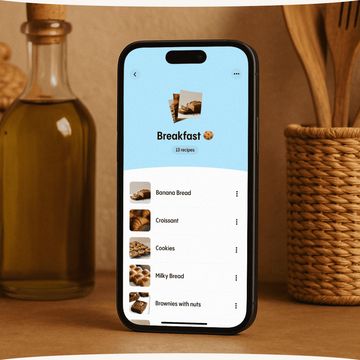
To save a recipe from Instagram, tap the bookmark icon under the post or Reel; it goes to your Saved list, and you can sort it into a collection. That keeps the post, not the recipe: the amounts are often only in a long caption, in the video or in a DM, and the post can be deleted. To keep the recipe itself, share or paste the Instagram link into a recipe app like Recify, which writes out the ingredients and steps.
How do you save a recipe on Instagram?
You save it with the bookmark icon. It works the same for photo posts, carousels and Reels.
- Tap the bookmark (Save) icon on the post or Reel.
- To sort it, choose a collection, or create a new one such as “Soups” or “Sunday baking”.
- To find it later, open Saved from your profile.
Your Saved list is private, and collections are a good way to keep cooking posts away from the travel spots and outfit ideas you also bookmark.
Why is Instagram Saved a fragile place for recipes?
Saved is fragile because it keeps someone else’s post, and the recipe is usually scattered around it. These are the usual problems:
- The recipe lives in the caption, the video or your DMs. Some creators write everything in a long caption, some say it in the Reel, and many ask you to “comment RECIPE” and send it by message. One recipe, three places to look.
- Posts disappear. A save is a bookmark to the creator’s post, not a copy. If the creator deletes it or makes the account private, you should expect to lose it, and your collection quietly shrinks.
- You can’t search it. Saved has no search by ingredient or by dish. Finding last spring’s lemon pasta means scrolling past hundreds of thumbnails.
- You can’t print it or scale it. There’s no clean ingredient list, no way to make half a batch, and no step view to cook from.
For inspiration, Saved is great. For recipes you cook more than once, you want a written copy in one place.
Instagram Saved vs. a recipe app
Here’s what each one keeps for you.
| At a glance | Instagram Saved | A recipe app (Recify) |
|---|---|---|
| What you keep | The post or Reel | A written recipe, plus the link to the post |
| Ingredients and steps | In the caption, the video or a DM | Listed and numbered |
| If the post is deleted | It’s gone from Saved | The recipe stays |
| Search | By scrolling | By title or ingredient |
| Organize | Collections | Collections you can rename, color and sort, and a weekly meal plan |
| Print and share | Send the post | PDF, a share link, or images of the recipe |
| Works on | iPhone and Android | iPhone, iPad and Android |
How do you save an Instagram recipe with Recify?
You send Recify the post’s link, and it turns the Reel or post into a written recipe with ingredients, method and servings, crediting the original creator. On iPhone you can do it without leaving Instagram.
On iPhone or iPad: share from Instagram
This needs iOS 17.6 or later.
- On the post or Reel, tap the Share icon (the paper plane).
- Choose Recify from the share options. You may need to scroll the row of apps or tap More to see it; from there you can also add it with Edit Actions.
- Pick the collections for the recipe and tap Continue.
- Keep scrolling Instagram. The recipe is imported in the background and a notification tells you when it’s ready.
If Recify doesn’t appear at all, open the Recify app once, then try again. The full guide is in Settings → How to save recipes.
On Android, or any phone: copy and paste the link
Recify has no share option on Android, so the link travels by copy and paste.
- On the post or Reel, tap Share, then Copy link.
- Open Recify. If Home shows Link detected, tap it and the import opens with the link already in.
- Otherwise tap + → Recipe → Link, paste the link and tap Continue.
- Feel free to leave the app. Reels take a little longer than photo posts; you’ll get a notification.
What about “comment RECIPE” and “link in bio” posts?
You can save those too, as long as you can reach the recipe itself. Recify needs the recipe somewhere it can read: in the caption, said out loud in the Reel, on a website or in text you paste.
- “Link in bio”: open the creator’s profile, follow the link to the recipe page and save that page’s link in Recify, the same way.
- “Comment RECIPE and I’ll send it”: when the message arrives, copy the link it contains and paste it in Recify. If the message holds the recipe as text, copy it and paste it into the Text tab of the import screen (at least 50 characters).
- Music only, no recipe anywhere: Recify can’t invent what isn’t there. Look for the creator’s website, or save another version of the same dish.
A checklist for your first Instagram imports
Use this the first few times, until it becomes habit.
- Save the Reel or post link, not a screenshot of it.
- Pick a collection while you share, so the recipe lands in the right place.
- Open the recipe once and check the amounts. The AI can make mistakes; fix anything with Edit.
- Set the servings with + / −. To double or halve a list you found elsewhere, use the free recipe scaler.
- Sign in with Google, Apple or email, so your recipes are on every device and safe if you change phones.
How do you keep an Instagram recipe collection tidy?
Keep collections few and practical, and give each saved recipe a job.
- Name collections after how you cook, not after the creator: “Quick lunches”, “Freezer friendly”, “Guests”.
- Color them so the ones you use most stand out on the Home screen.
- Drop recipes into the meal plan as soon as you save them, if you already know when you’ll cook them.
- Cook from the step view. The STEPS button shows one step at a time, full screen, so you don’t have to replay the Reel with sticky fingers.
Instagram is only one of the places good recipes hide. The same approach works for videos in how to save recipes from TikTok, and for food blogs and pins in how to save recipes from websites and Pinterest. You’ll find more guides on the Recify blog.
Frequently asked questions
Where do saved posts go on Instagram?
Saved posts and Reels are in the Saved section, which you reach from your own profile. Only you can see what you have saved, and the creator isn’t told.
What does “comment RECIPE” on a Reel mean?
Some creators send the full recipe by direct message to anyone who comments a keyword. The message usually holds a link to their website or the recipe text, and both can be saved in Recify: paste the link, or paste the text in the Text tab.
Can I save recipes from Facebook too?
Not in Recify yet: importing from Facebook isn’t available. If the Facebook post links to the creator’s website, save that website link instead.
Can I change a recipe after importing it from Instagram?
Yes. Open the recipe, tap the menu (…) and choose Edit. You can change the photo, the name, the times, the ingredients and the method, so the recipe matches the way you really cook it.
Can I translate a recipe I found on Instagram?
Yes. Open the recipe, tap the menu (…) and choose Translate to read it in any of the app’s 8 languages. You can also turn on Auto-translate in Settings so new imports arrive in your language.