How to save recipes from TikTok (and actually find them again)
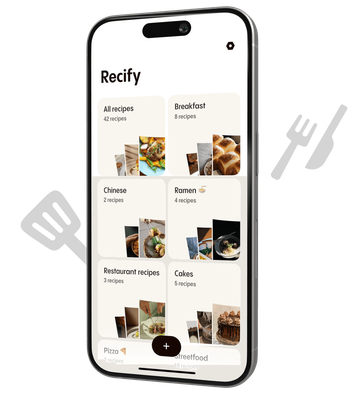
To save a recipe from TikTok, tap the bookmark icon on the video to add it to your Favorites, and sort it into a collection if you like. That keeps the video, not the recipe: if the ingredients are only said out loud, or the video is deleted later, you lose them. To keep the recipe itself, share or paste the TikTok link into a recipe app like Recify, which writes out the ingredients and steps for you.
What are the ways to save a TikTok recipe?
There are three common ways, and they keep very different things.
| At a glance | TikTok Favorites | Screenshots or notes | A recipe app (Recify) |
|---|---|---|---|
| What you keep | A link to the video | Whatever you managed to copy | The written recipe and a link to the video |
| Ingredient amounts | Only by rewatching | Only if you typed them | Listed for you |
| Search by ingredient | No | Hardly | Yes |
| If the video is deleted | Gone | You keep your notes | You keep the recipe |
| Print or scale it | No | No | Yes: PDF, and + / − servings |
| Effort per recipe | One tap | Several minutes | One share or one paste |
Favorites are perfect for “maybe one day” videos. For recipes you actually plan to cook, it pays to keep a written copy.
How do you save a recipe in the TikTok app?
You save a recipe in TikTok by adding the video to your Favorites. It takes a second and is the right first step for anything you might cook.
- Open the recipe video.
- Tap the bookmark icon. The video is now in your Favorites, on your profile.
- To keep things tidy, choose or create a collection (for example “Dinners” or “Baking”) and add the video to it.
Collections help a lot once you have more than a handful of saved videos. Still, each one is a pile of videos, and finding “that chicken thing with the yogurt sauce” means scrolling and rewatching.
Why are TikTok Favorites a fragile recipe box?
Favorites are fragile because they save a pointer to someone else’s video, not the recipe. Four things tend to go wrong:
- The recipe is only in the video. Many creators say the amounts out loud, or flash them on screen for a second. The caption might just say “full recipe below” or nothing at all. To cook, you pause, rewind and squint, with flour on your hands.
- Videos disappear. Creators delete videos, make accounts private or leave the app. A Favorite is a bookmark, not a copy, so when the video goes, the recipe goes with it.
- Nothing is searchable. You can’t ask your Favorites for “recipes with chickpeas” or “something with what’s in my fridge”. You can only scroll.
- You can’t print or scale it. There’s no ingredient list to print, no way to double the batch, and no step-by-step view to follow while you cook.
None of this is a problem for a quick idea. It becomes one the evening you want to cook the recipe and can’t find it, or find it and can’t follow it.
How do you save a TikTok recipe with Recify?
You give Recify the video’s link, and it turns the video into a written recipe: ingredients, method and servings, with the original creator credited. There are two ways to hand over the link.
On iPhone or iPad: share straight from TikTok
This works on iPhone and iPad with iOS 17.6 or later.
- Open the recipe video in TikTok and tap Share.
- Tap Recify in the list of apps. If you don’t see it, tap More (or Edit Actions) and add it. If it still doesn’t show, open Recify once and try again.
- Choose the collections you want the recipe in, then tap Continue.
- Go back to scrolling. The import runs in the background, and a notification tells you when the recipe is ready.
The same steps are in the app under Settings → How to save recipes.
On Android, or any phone: copy and paste the link
Android has no share option for Recify, so you paste the link instead. It takes a few seconds longer and gives the same result.
- In TikTok, tap Share, then Copy link.
- Open Recify. When a link is copied, Home shows Link detected: tap it and the import opens with the link filled in.
- If you don’t see it, tap + → Recipe → Link, paste the link and tap Continue.
- You can leave the app while it works. Videos take a little longer than websites; the notification arrives when it’s done.
What if the recipe is only said out loud?
That’s fine: Recify works from what’s written in the caption and from what’s said in the video, so a creator talking through the amounts is enough. What it can’t use is a video with only music and no recipe anywhere, written or spoken.
If an import says it didn’t find a recipe:
- Check the caption and the creator’s profile for a link to their website, and save that link instead.
- If the recipe is written in the comments or a pinned reply, copy the text and paste it in the Text tab of the import screen (it needs at least 50 characters).
What should you check after importing a TikTok recipe?
Take thirty seconds to look the recipe over the first time you open it. Here is a short checklist:
- Amounts look right. The app’s AI can make mistakes, especially with quick spoken recipes. Fix anything with Edit in the recipe menu (…).
- Servings fit your table. Tap Servings and use + / − to scale the ingredients; “Reset to original” goes back. For a quick sum outside the app, the recipe scaler doubles or halves any list.
- It’s in a collection. Group recipes the way you cook: “Weeknight”, “Meal prep”, “Holiday baking”.
- The creator is credited. The recipe keeps the original creator, and View Original opens the video when you want to see a technique.
- You’re signed in. Recipes saved without an account can be lost if you delete the app or change phones. Sign in with Google, Apple or email to keep them on every device.
How do you keep TikTok recipes you’ll actually cook?
Save less, sort as you go, and plan a few each week. A recipe box with 400 untouched videos is just a second For You page.
- Sort on the way in. Choosing a collection while you share takes a second and saves a lot of scrolling later.
- Plan, don’t just save. Put a saved recipe on a day in the Meal Plan tab, so it turns into dinner instead of a memory.
- Cook from steps, not the video. The STEPS button shows one step at a time on a full screen, which is much easier with messy hands than scrubbing through a clip.
- Search by ingredient. Have half a bag of spinach? Search for it and see which saved recipes use it.
If you also save recipes from Reels, the same idea works there: see how to save recipes from Instagram. For blogs and Pinterest pins, read how to save recipes from websites. And if you want to see what the app looks like before trying it, the Recify home page has a quick tour.
Frequently asked questions
Do TikTok Favorites disappear?
They can. A Favorite is a bookmark to the creator’s video, not a copy of it, so if the creator deletes the video or makes their account private, you should expect to lose it. A written copy of the recipe is the only version that is really yours.
Can I share a TikTok recipe collection with someone?
TikTok announced shared collections in December 2025: two people who follow each other can save videos into one collection together. In Recify you share single recipes instead, with Share Link, and they appear in your friend’s Recify app.
Can I save TikTok recipes on Android?
Yes. On Android, copy the video’s link in TikTok and paste it in Recify. The share-sheet shortcut is only on iPhone and iPad; the result is the same written recipe.
Is it free to save TikTok recipes in Recify?
Recify is free to download and comes with a limited number of free imports, so you can try it on a few recipes. A Pro subscription gives unlimited imports, and recipes you have already saved are never locked.
Can I still watch the original TikTok after importing it?
Yes. Each recipe keeps the original creator and a View Original option in its menu, so you can go back to the video to see a technique or to thank the creator.